Author: KloudConnectors

  • 5 Steps to Get Your Business Ready for the Holiday Sales Season !!

    5 Steps to Get Your Business Ready for the Holiday Sales Season !!

    5-steps-to-get-your-business-ready-for-the-holiday-sales-season

    Holiday season generates maximum business in the shortest period for most of the online businesses. The preparation for holiday season starts at least 6 months earlier in most of the businesses. Few businesses are little late and they start waking up just before the holiday season. This article is for these businesses to get their act together for holiday sales seasons in the shortest possible time.

    1. Your website : 

    Your website is your face to the world. Use following check list to check about this.

    • Responsive design : Make sure that your website is responsive. What we meant by responsive is that it should render correctly on mobile devices viz mobile and tablet. Remember, according to survey 60% of the visitors visit via mobile devices. So if your website is not mobile friendly, please work on this aspect on war footing. Talk to us if you need any expedited help.
    • Website content : Please check your website for the appropriate content. Writing clean and original content improves your website ranking and helps in SEO.
    • Metadata and Keywords : Please make sure that you use correct metadata and keywords so that your site can be found by search engines.
    • Set up google analytics : Set up google analytics for monitoring the visitors, goals , behaviors etc of your visitors. Analyze the traffic at all times and make the appropriate corrections
    • Security vulnerabilities : Check if your site has any security vulnerability. Speak to experts and get the audit done.
    • Load Testing : During the holiday season, the traffic to your site may increase multi-fold. Work with your IT team and get your site load tested to avoid crashes during the peak season.

    2. Products and pricing :

    • Product upload : Create appropriate images and upload your products to your site. Double check for any errors in descriptions, features etc. As far as possible automate this uploading process. It can be very time consuming and frustrating to upload 100s and 1000s of products to online e-commerce system.
    • Also set up your pricing appropriately

    3. Supply chain management :

    • The success of any online business also depends on how efficient their supply chain is. You can get into terrible situation if there is a demand supply mis-match.
    • Talk to your suppliers and set up your supply chain network appropriately
    • Stock your warehouse . Deploy warehouse management system / Inventory management system for better control
    • Set up automatic connectors between your e-commerce store and inventory management system. This saves tremendous time and increases productivity by leaps and bounds. Check out our e-commerce, crm, accounting, email marketing  and  inventory connectors on ready connectors page.
    • Set up your drop ship arrangements.

    4. Customer Support :

    • Remember, these days customer support is new sales.
    • Set up customer support process.
    • Set up the escalation process as well.
    • Clearly mention support timings on the website.
    • Set up communication process
    • Train customer support agents properly. Excellent customer support delights the customers and forces them to remain loyal with your brand. It takes lots of efforts to get new customers whereas getting repeat order from the same customer is very easy if you maintain highest standard of customer support.

    5. Marketing/ Sales :

    If you need any help in automating some of these activities, please talk to us. Good luck !

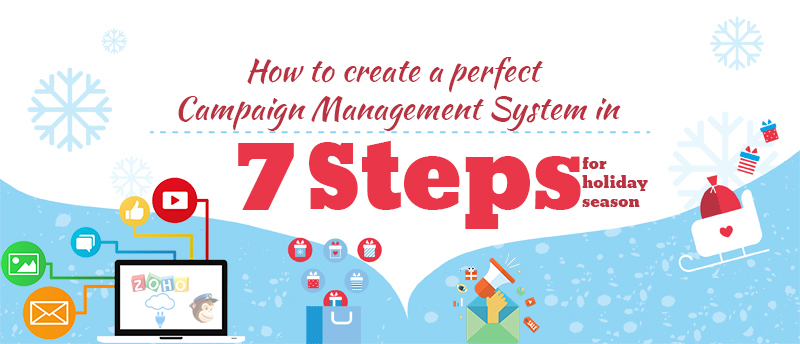
  • How to create a perfect campaign management system in 7 steps for Holiday season?

    How to create a perfect campaign management system in 7 steps for Holiday season?

    Campaign Management system using Zoho CRM, MailChimp and KloudConnectors

    Holiday season is round the corner. Entrepreneurs can create a perfect Campaign Management system using Zoho CRM, MailChimp and KloudConnectors in 7 steps without breaking their bank .

    Step I – Sign up for Zoho CRM :

    Zoho CRM is one of the leading and value for money cloud based Customer Relationship Management system. They have different editions. Every edition has different features and price points. They have free , standard ( $12/month/person), Professional , Enterprise, CRM Plus and Ultimate editions. For creating campaign management system, we recommend you to sign up for at least standard plan. Free plan will work as well. Upload your leads and contact to respective modules in Zoho CRM. If you haven’t signed up Zoho CRM yet then you can easily sign up here.

    zoho-sign-in

    Step II – Sign Up for MailChimp :

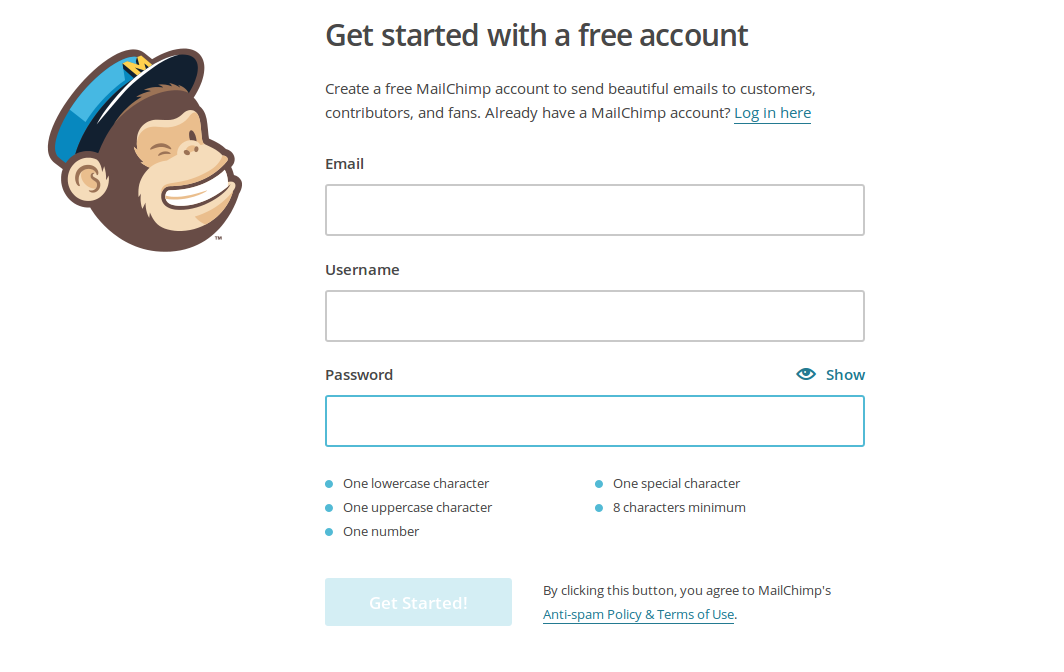
    MailChimp is probably the best email marketing system. MailChimp has a free plan which allows you to send 12000 emails and offers 2000 free subscribers. If you want to send more emails or want to have more subscribers, you can sign up for higher paid plans.

    mailchimp_signup_screenshot

    Step III – Sign up for KloudConnectors :

    KloudConnectors is a cloud integration platform which connects several popular saas systems. KloudConnectors has more than 55 ready connectors which integrates systems like Zoho CRM and MailChimp. KloudConnectors can integrate several other crm systems and also email marketing systems. It also has several connectors to connect your online stores ( Shopify, BigCommerce, WooCommerce, Magento, 1Shopping cart etc). Zoho and MailChimp connector ( Link) is available for a small sum of $19.99 for a month or at a discounted annual price of $179 per annum. Sign up for any of these subscription. KloudConnectors uses PayPal as a payment gateway so you are always in control of your subscription.

    ztm

     monthly plan annual plan


    Step IV – Plan your campaign :

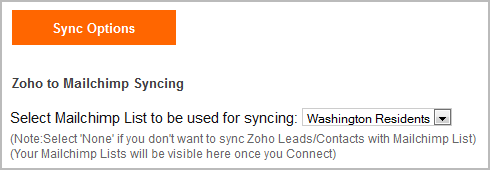
    Create your email template in MailChimp. You can use standard template in MailChimp or design your own template using simple to use designer. Also create a MailChimp list where you want KloudConnectors to sync your leads or contacts.


    kc_list_image

    Step V – Set up your connector in KloudConnectors :

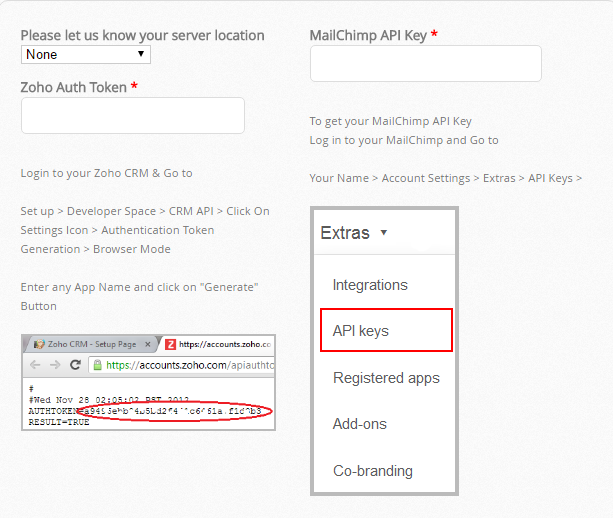
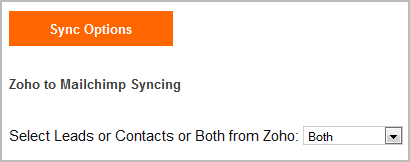
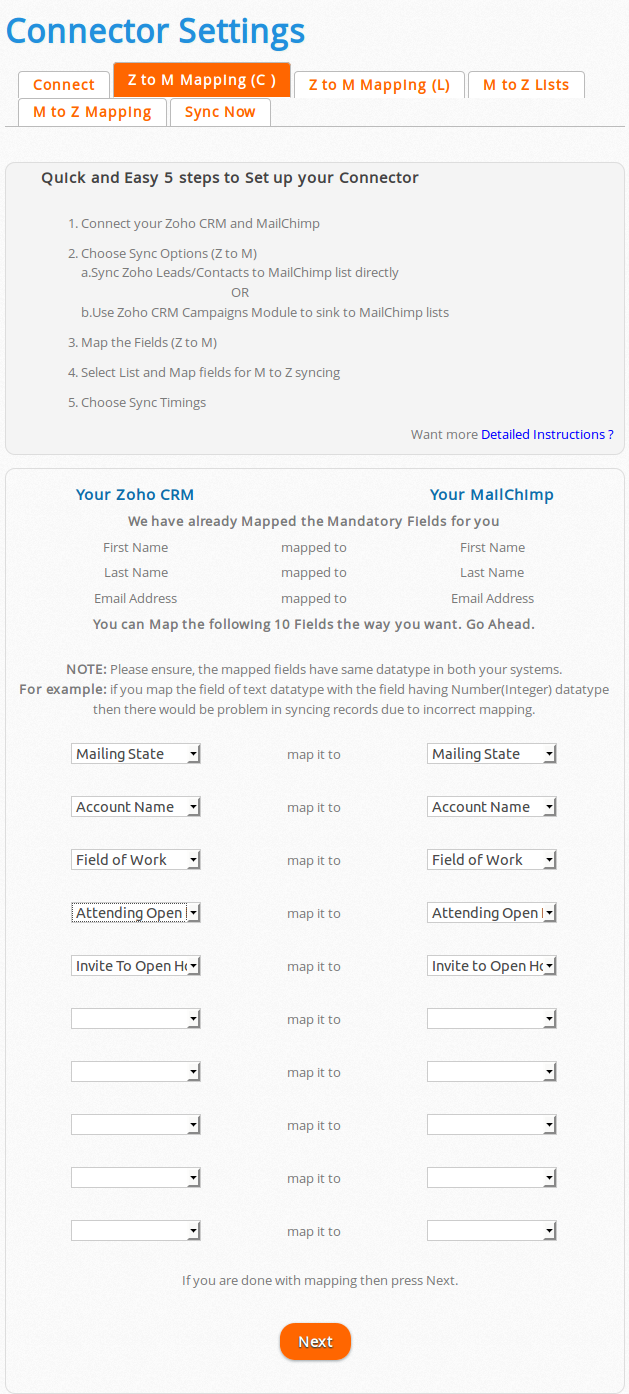
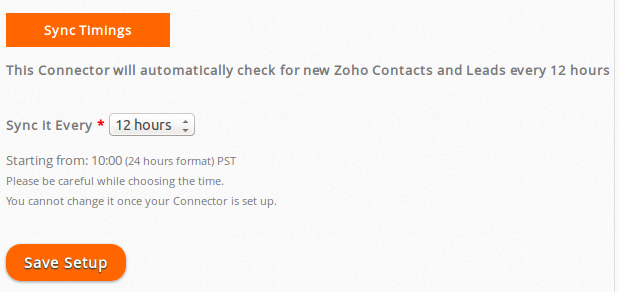
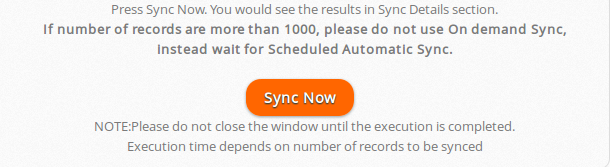
    You would need to follow instructions given in the User Guide of your connector on kloudconnector’s site and set up your connector. It is very easy to set up if you follow the instructions. It takes about 3 minutes to set up your connector. You can decide to sync your   Leads/Contacts or Zoho CRM campaign to MailChimp list. You can also map the fields from your Lead/Contacts modules with MailChimp list. KloudConnectors sync your data every 12 hours or on demand. If you want to sync immediately, just press sync now and your data would be synced with MailChimp.

    kc_setup

    select_lead_contact_zoho select_mailchimp_washington_list

    map_fields

    cron_setup

    sync_now

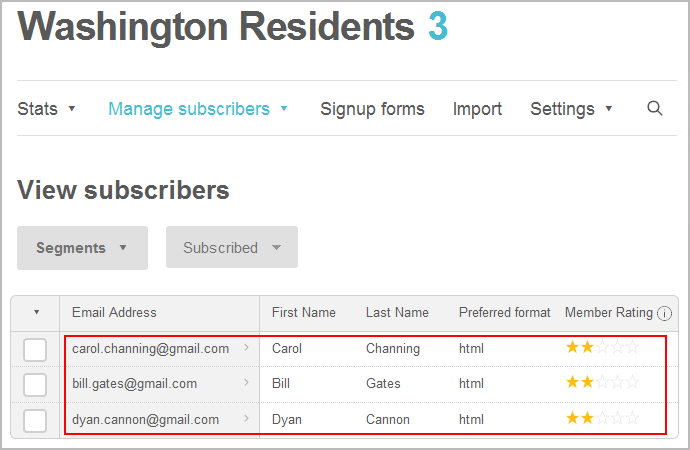
    list_subscribers_in_mailchimp

    Step VI – Create a campaign in MailChimp using the list ( or segment in the list ) and the template created in earlier steps.

    Step VII – Send or schedule your campaign in MailChimp

    If you want to see the campaign results like open , bounced etc in Zoho CRM for your leads/contacts then select the checkbox for syncing campaign statistics check box in KloudConnector set up.

    sync_statistics

    details_campaign_in_zoho

    KloudConnectors also offers Constant Contact, Campaign Monitor and iContact Connectors for Zoho CRM. You can follow the same process for creating solid campaign management system using these software. Good luck !

  • KloudConnectors announces Campaign Monitor, Constant Contact , iContact Connectors for SugarCRM !

    KloudConnectors announces Campaign Monitor, Constant Contact , iContact Connectors for SugarCRM !

    SugarCRM

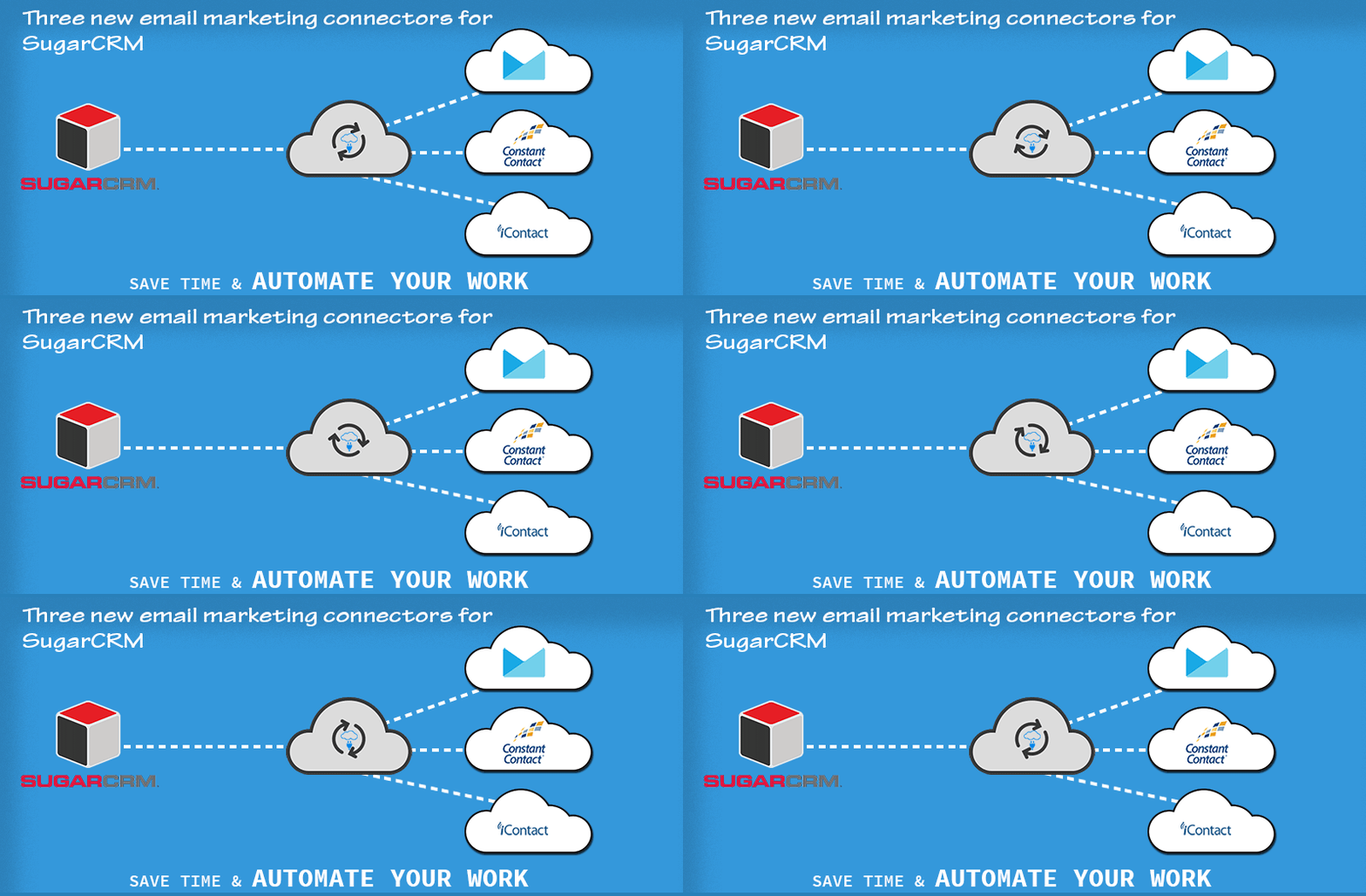
    KloudConnectors announces three new email marketing connectors for SugarCRM

    KloudConnectors has announced Campaign Monitor, Constant Contact and iContact Connectors for SugarCRM. SugarCRM is one of the leading CRM system. Although SugarCRM has built in email campaigning module, many customers are looking for more sophisticated and feature rich email marketing systems for sending their campaigns. This prompted KloudConnectors to build these connectors. Some of the features of this connectors are as follows.

    Features:

    • 15 days free trial – no credit card required
    • Sync Leads / Contacts with email marketing lists
    • Sync unlimited records
    • Schedule your sync once during set up and connector runs automagically every day
    • Sync email subscribers from Email marketing systems back into SugarCRM as Leads/Contacts
    • Sync on demand
    • Monitor your campaign’s success in SugarCRM for Constant Contact and Campaign Monitor connectors
    • Support is available through online chat , email and telephone
    • Low monthly and annual pricing
    • Subscription through PayPal. This ensure customers have full control on their subscriptions
    • Connector dashboard showing how many records synced , errors and next scheduled sync

    So what are you waiting for ?

    Sugar CRM to iContact Connector

    sctic

    Sugar CRM to Campaign Monitor Connector

    sctcm

    Sugar CRM to Constant Contact Connector

    stcc

    Try Now Try Now Try Now
    monthly plan

    annual plan

    monthly plan

    annual plan

    monthly plan

    annual plan

  • KloudConnectors will undergo price revision for all connectors from 1st Nov 2016

    KloudConnectors will undergo price revision for all connectors from 1st Nov 2016

    KloudConnectors announces Price increase !!

    Increase in price kloudconnectors

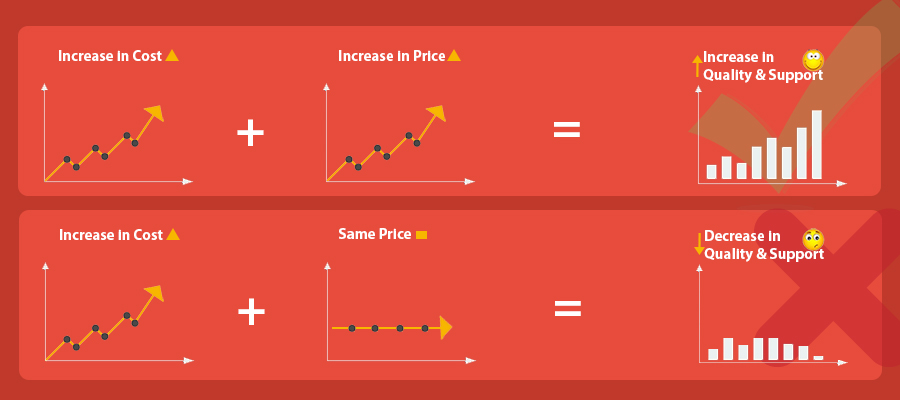
    For the last four years, KloudConnectors have charged the same  rates for all the connectors in spite of rising office expenses, server cost and salary increases.We have made every attempt to avoid the increase, but we refuse to compromise on quality. This is our only recourse. Effective November 1, 2016, we shall increase the price of connectors across the board. We would also be introducing annual plan. Many of our customers are with us for several years and this annual plan should help them. We shall announce the new pricing structure soon.

    We value you as a client and want to continue serving you. We hope to continue our excellent relationship with our clients, and assure you our quality of service will reflect a similar increase.

  • Product Update: KloudConnectors now supports EU server for Zoho Apps

    Product Update: KloudConnectors now supports EU server for Zoho Apps

    EU servers for zoho apps

    Support for Zoho EU servers

    KloudConnectors is pleased to  announce support for EU servers in all kloud connectors for Zoho products. Now, all EU customers who are on EU server of Zoho would be able to use KloudConnectors for connecting their business apps.

    How to sign up and configure support for EU server ?

    Create an account with kloudconnectors.

    • Once you are logged in select your connector by going to Ready Connectors page.
    • Start Trail or subscribe.
    • Goto Connector setting page in MyAccount Section.
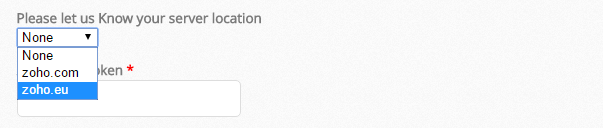
    • Select your server location and set up your connector.


    • EU servers for zoho apps


  • Zoho CRM to SignNow Connector

    Zoho CRM to SignNow Connector

    KloudConnectors Announces Zoho CRM to SignNow connector !! Improve cashflow !!

    Zoho CRM to SignNow Connector KLOUDCONNECTORS

    Improve your Cashflow

    Get your Zoho CRM Quotes Digitally signed with SignNow and save time !! KloudConnectors has announced Zoho CRM to SignNow connector to e-sign your quotes.  The connector takes all the quotes from Zoho CRM which are of specific status and sends it to your customers for digital signature. This saves tons of time in printing, scanning and uploading your quotes. The connector also attaches signed quotes to respective quotes for reference. KloudConnectors always look for opportunities to make our customer’s life easier. We decided on SignNow because of their features and also cost. All other e-signature software had a higher cost of sending documents through API. SignNow is more value for money.

    This helps in shorter sales cycle and improves your cashflow. The connector works in following manner:

    1. Create a KloudConnectors account and try or buy the connector
    2. Set up your connector
    3. Create a quote in Zoho CRM
    4. When the connector runs, it send the Quote for signature to your customer via SignNow for e-Signature
    5. Your customer signs and the document is filed as attachment to this quote in Zoho CRM. Connector also keeps the status of the document by attaching notes to Quote

    The connector creates a standard Quote template for e-Signature. We can also customize the quote template based on your exact template at an additional cost. Please get in touch with support@kloudconnectors.com for customizing your quote template.

    Why use ZTSN?

    • Automatically adds the Zoho CRM Quotes as Document in SignNow.
    • Send the Document from SignNow to the related customer for the signature.
    • Sync Back the signed document in Quote as Attachment and the statues of document is placed in notes.
    • Stop going back and forth between your Zoho CRM and SignNow for Important Business information.

    Features

    • Schedule the Sync once and Enjoy the benefits every single day. Focus on your core business
    • Connect your 2 most Important Systems of your Business, your CRM and your e-signature system.
    • NEW* Sync any time

    This connector is available for 15 days free trial.

    Try NowBuy Now


  • KloudConnectors announces bi-directional Inventory sync connector between Magento and Zoho Inventory !!!

    KloudConnectors announces bi-directional Inventory sync connector between Magento and Zoho Inventory !!!

    Magento and Zoho Inventory Bi-directional Stock Sync Connector

    Inventory sync connector between Magento and Zoho Inventory

    Keep Magento and Zoho Inventory stock level in Sync !!

    Many of our customers had asked for inventory level sync between Magento and Zoho Inventory. KloudConnectors is pleased to announce general availability with immediate effect.

    With this connector customers would be able to keep the inventory level in both the system up to-date. This will ensure that one doesn’t sell the out of stock items on Magento store.

    Why use Zoho Inventory to Magento Bidircetional stock sync Connector ?

    • ZInvTMagentoSS integrates Ecommerce system with the Inventory Management software.
    • It connects your Magento and Zoho Inventory.
    • It can sync all your Products in Zoho Inventory.
    • It can sync the inventory level your Magento Products into Zoho Inventory.

    Features

    • Schedule the Sync once and Enjoy the benefits every single day. Focus on your core business
    • Sync Products from your Magento into Zoho Inventory autoMagically.

    Also check out  our other Magento to Zinventory connector for syncing orders related customers and products here:

    This connector is available for 15 days free trial.

    Inventory sync connector between Magento and Zoho Inventory

    • One Way Sync
    • Unlimited Products
    • Unlimited Orders


    Try Now Buy Now


    Magento to Zinventory connector For Bi-directional Stock Sync Connector :

    This connector is available for 15 days free trial.

    zinvtmagentoss

    • Two Way Sync
    • Unlimited Product Sync
    • Get Product Inventory from Magento


    Try NowBuy Now


  • Magento to Zoho Inventory Connector Gets Update !!!

    Magento to Zoho Inventory Connector Gets Update !!!

    magento-to-ZIN-2


    Are you trying to Sync all your products from Magento to Zoho Inventory to set up products in ZIventory ? It’s time to rejoice, we have updated our Magento and Zoho Inventory connector to sync all your products in Magento to Zoho Inventory. This will set up your Zoho Inventory with the same products as in Magento. Please go through FAQs below.

    1.Would I need to pay for this ?

    Answer: No. This new feature would be available free of cost for all the trial as well as paid customers.

    2.How to install ?

    Answer : The steps are as follows:


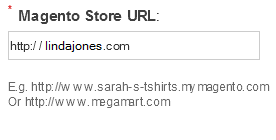
    1) Now, Put in your Magento Store Address

    magento-3


    2) Get your Magento Username and API Key

    Log in to your Magento Account

    Step-1a_1


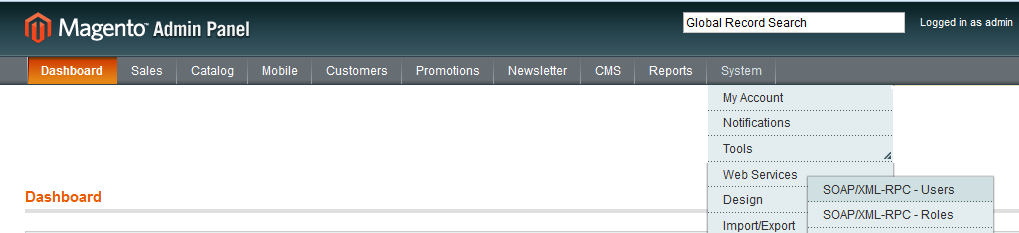
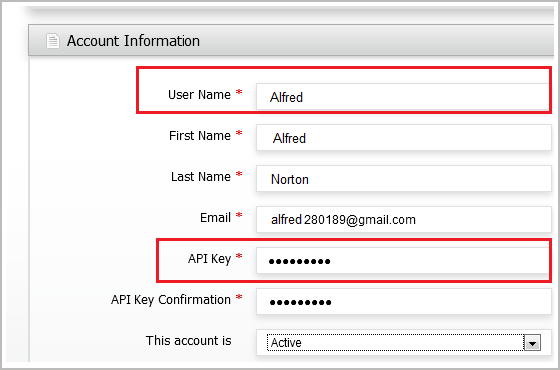
    3) Go to System > Webservices > Users > Add Users

    Enter all the details

    Step-3b1


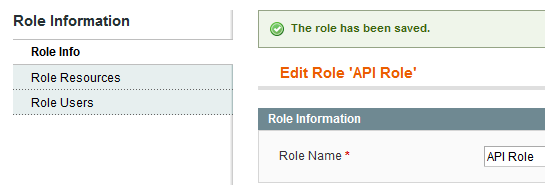
    4) Create new Role

    createRoles


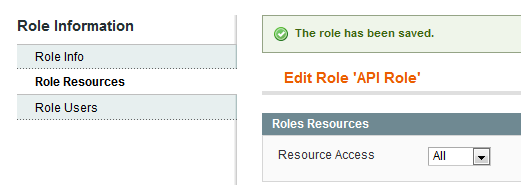
    5) Select “All” from Role Resources

    assign_resources


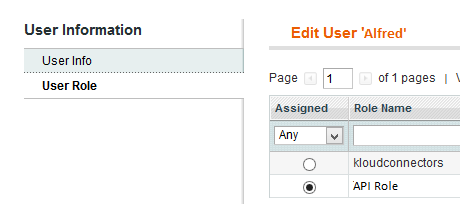
    6) Now Go to System > Webservices > Users > Select the role which has Resource Access “All”


    assign_role


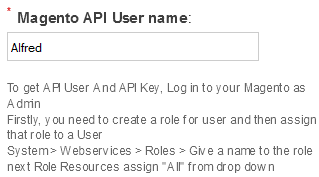
    7) Now Enter your Magento User Name

    magento-4


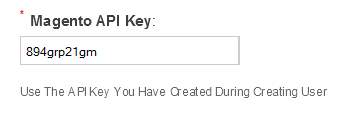
    8) Enter the Magento API Key

    magento-2


    3.Do I need to do any settings in  in KloudConnectors to enable this feature ?

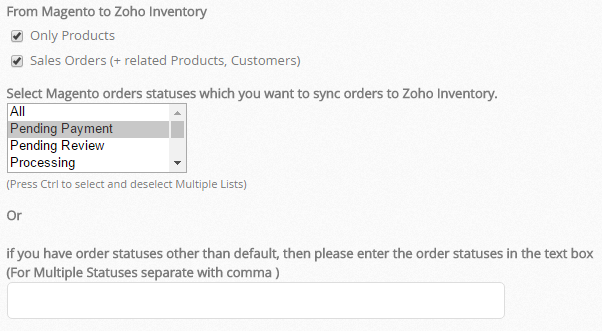
    Answer : You just need to go in your KloudConnectors account and change the setting as per your requirement for example if you want to sync only your Magento products in your Zoho Inventory choose “only products” option and if you want to sync both sales orders and product choose both the options.

     Magento products in your Zoho Inventory


    4.How does this feature work ?

    Answer :Our Magento to zoho inventory connector can create product and Sales orders and corresponding Contacts and Products in Zoho Inventory.

    Few things you need to take care of :

    – Sku is mandatory and uniqe for every product so make sure that all your Magento Products have SKU.
    – If you have product in both the system please make sure that product name and sku should be same.
    – If you use taxes in your order check in your zoho inventory account toenable your tax setting.

    This connector is available for 15 days free trial.

    Try NowBuy Now


    If you have any questions, please write to support@kloudconnectors.com.

  • WooCommerce to Zoho CRM connector is here !!

    WooCommerce to Zoho CRM connector is here !!

    WooCommerce to Zoho CRM Connector

    Kloud Connectors is happy to announce addition of one more Connector to our family, WooCommerce to Zoho CRM Connector (WooCTZ) . Now, WooCommerce users can sync their Sales Orders, Customers, Products and relevant taxes seamlessly with one of the best Customer relationship management software – Zoho CRM.

    Managing  customers and communicating with them is very critical for business success.  eCommerce shop needs to engage with their customers all the time. This connector is designed to follow help customers  solve this problem. It allows you to sync WooCommerce Orders, Customers and Products with Zoho CRM. This ensures your sales team is equiped with the right information about their customers.

    This integration between WooCommerce and Zoho CRM by Kloud Connectors gives you a facility to schedule the automatic syncs. This way, you don’t have to remember to sync them, the changes will get synced automatically everyday at the time of your choice. The dashboard of your Kloud Connectors account will show you Sync Details as well as Sync Errors if any, so that you can take corrective actions right there. Giving Such transparency in syncs, such control over data to all the users is a hallmark of Kloud Connectors. And for this connector as well, we have provided all these facilities to give a consistent experience to all our users. As usual, this connector comes with unlimited record sync capabilities.

    15 days Free Trial is available for WooCommerce to Zoho CRM  Conncetor. This will help you to  see it in action before clicking the buy button. This connector, has no sync limits on number of records. This connector is  priced very attractively at US$ 25 per month. For such a small amount, you can save 100s of hours in manual syncing and also increase your customer engagement through ZCRM.

    If you are using WooCommerce and trying to increase your customers engagement and revenue,  why don’t you give it a try ? Trial is Free.If you have any questions, please get in touch with us on supportATkloudconnectors.com

    Try Now Buy Now

  • Kloud Connectors announces new connectors, supports Salesforce, Highrise, Insightly, Vend, Quickbooks, FreeAgent

    Kloud Connectors, the cloud integration platform that connects business processes residing in different Clouds, announced major upgrade by announcing new connectors and support for Salesforce, Highrise, Insightly, Vend and many more cloud Apps.

    4th Dec 2014, Pune, India: Today, integration is one of the criteria people consider while choosing any cloud services for their business. If you are already using a couple of clouds like CRM, Accounting then while going for one more cloud to manage your Marketing, you look for compatibility. You look for easy integration with your existing clouds. And often after picking up a few best clouds you realize that there is no ready made integration available for these two. That means, you will either have to get such integration developed (spend time and money) or abandon one of those two clouds.
    The Cloud companies are busy making their clouds better and powerful. Each one is busy adding more and more features to their cloud services. And it is practically impossible to expect these companies to come up with integration with each and every other cloud around. Even though they do provide some rudimentary integration with a few major clouds, it’s not always going to be enough. There are several companies who are trying to help customers in these areas. Customers no longer have to use a particular cloud just because it is already closely integrated with the one he has.
    While announcing changes and addition of new connectors, Mr. Vinay Joshi, CEO of Suvichartech said “We have been around for two years now. We have a very stable customer base with customers in 30 countries. Till today, we were concentrating only on one platform. We have been getting enquiries for several other SaaS systems for creating Kloud Connectors. The amount of interest shown by these customers was, in fact, main driver why we felt compelled to develop them. We are announcing addition of Salesforce, Highrise, Insightly,Vend, Kashflow, FreeAgent, Quickbooks Online, Magento, Zendesk, Workflowmax , Eventbrite, Evernote to our platform.”
    “We have launched 31 new connectors taking our ready connectors tally to impressive 39. Our portal was earlier centered around Zoho CRM. We have added few more connectors for Zoho CRM. Now we have 15 tightly integrated connectors for Zoho CRM alone. We hope that Zoho’s customers would benefit tremendously from these new connectors. We also hope that Salesforce, Highrise, Insightly, Vend, Kashflow, FreeAgent, Quickbooks, Magento, Zendesk, Workflowmax, Eventbrite, Evernote customers would find these new connectors useful. All Kloud Connectors are designed to give end users a broader choice, freedom to choose the best clouds for their business without worrying about Integration issues.” Mr. Joshi said in his closing remarks. He is admittedly sold out on Cloud, Social and Mobile Technologies which are picking up fast. He feels since each of these are quite important for their target segment (SMBs), we can expect Suvichartech to come up with many exciting products and services involving Cloud, Social and Mobile Technologies.
    The one thing that sets apart Kloud Connectors from other integration platforms is the design of connectors. Every connector is designed for seamless business process execution in cloud. This is not a data dumping service from one place to other. The design of each connector is aimed towards facilitating the underlying purpose behind using those individual clouds.
    For example, You use MailChimp to send out campaigns/newsletters. And you use Saleforce to store your relevant information about your customers. So the connector between them should work to help you send out those campaigns as well as capture relevant customer information for effective decision making. And that’s exactly what Salesforce to MailChimp connector (SFMC) does.
    Cloud users are happy that clouds are continuously improving. That’s well and good. Since, Connectors sit on top of two constantly evolving software, guys at Kloud Connectors will have to be on their toes all the time. The functionality, the APIs of clouds keep changing and also the nature of integration demanded by customers keeps changing which is going to be a big challenge for those who create connectors. We at Kloud Connectors are confident of tackling this challenge just the way we have been doing all these years.
    Kloud Connectors would be focusing on increasing their product portfolio in the next quarter so that we are able to reach more and more organizations by connecting more clouds; said the sources close to management of Suvichartech, the company behind Kloud Connectors portal.

    About Suvichar Technologies:
    Suvichar Technologies is an ISO 9001:2008 certified consulting and services company. It is a cloud adoption and cloud integration specialist which offers a broad range of products and services including CRM Implementation/optimization, custom SaaS app development among others. One can find more information by visiting website atwww.suvichartech.com and www.kloudconnectors.com.

    A few lines about Clouds which Kloud Connectors has already connected:
    Zoho:
    Over 6 million users rely on Zoho products when it comes to online productivity, collaboration and business applications. Numerously awarded Zoho products are a hit with SMBs worldwide. More information about Zoho Corporation can be found at www.zoho.com.

    Mailchimp:
    MailChimp is a Email marketing service known for its commitment to User Experience and having a reputation of taking online security seriously. The catchy templates of MailChimp and their attractive forever free (freemium) plans make them a darling of online marketers. More information about MailChimp can be found atwww.mailchimp.com.

    Constant Contact:
    Constant Contact(CTCT), consistently ranked within 200 on Deloitte’s Technology Fast 500, has long been focused on giving powerful but affordable tools to small organization to grow better. Their email marketing service supported by KnowHow (free personalized coaching and product support) has helped many organizations connect and engage with their next great customer. More information about Constant Contatct can be found at www.constantcontact.com.

    Campaign Monitor:
    Elegant and beautiful templates combined with robust support have been hallmark of Email-marketing service by Campaign Monitor. Since 2004, they have added many big brands to their customers list spread across 100 countries. More information about Constant Contatct can be found at www.campaignmonitor.com.

    Xero:
    Xero is online accounting software for business. It is a web based system for invoicing/billing, accounts payable, bank reconciliation and bookkeeping. This publicly listed company backed by the likes of Craig Winkler (Australian Tech Entrepreneur), Peter Thiel (of Paypal) had a high profile IPO in 2007. More information about Xero can be found at www.xero.com.

    1Shoppingcart:
    They provide effective online tools to help small and large businesses, achieve success online. Their powerful, secure ecommerce storefront with Online Store Software helps many sell, promote, and grow world over. More information about 1Shopping cart can be found at www.1shoppingcart.com.
    Shopify:
    Shopify is an ecommerce platform that allows individuals and businesses to create online stores. Their powerful ecommerce website solution is easy for amateurs to start with and feature rich for experts. More information about Shopify can be found at www.shopify.com.
    BigCommerce:
    Launched in 2009, BigCommerce provides a comprehensive Cloud based service for retailers and merchants to manage e-commerce online and related tasks. Their affordable plans are tailored for small businesses to grow at their own pace. More information about BigCommerce can be found at www.BigCommerce.com.