Tag: KloudConnectors

  • Magento to Zoho Inventory Connector Gets Update !!!

    Magento to Zoho Inventory Connector Gets Update !!!

    magento-to-ZIN-2


    Are you trying to Sync all your products from Magento to Zoho Inventory to set up products in ZIventory ? It’s time to rejoice, we have updated our Magento and Zoho Inventory connector to sync all your products in Magento to Zoho Inventory. This will set up your Zoho Inventory with the same products as in Magento. Please go through FAQs below.

    1.Would I need to pay for this ?

    Answer: No. This new feature would be available free of cost for all the trial as well as paid customers.

    2.How to install ?

    Answer : The steps are as follows:


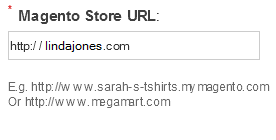
    1) Now, Put in your Magento Store Address
    magento-3


    2) Get your Magento Username and API Key

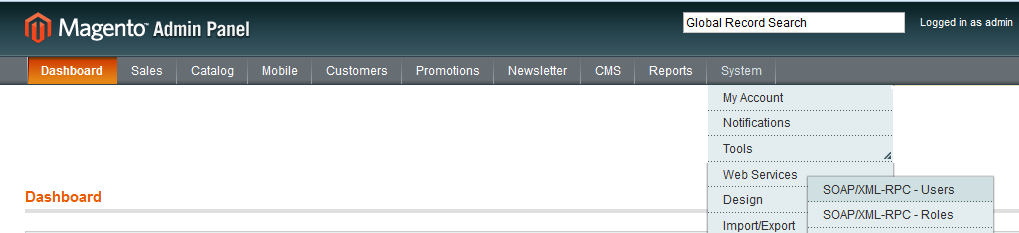
    Log in to your Magento Account
    Step-1a_1


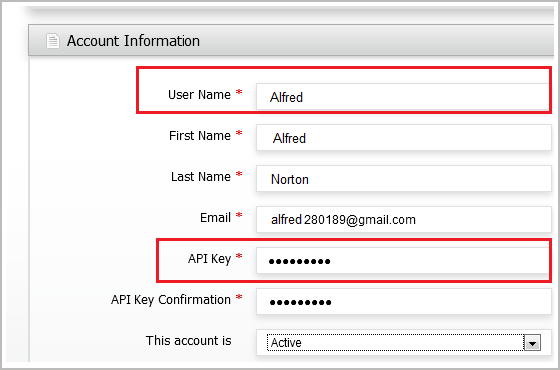
    3) Go to System > Webservices > Users > Add Users

    Enter all the details
    Step-3b1


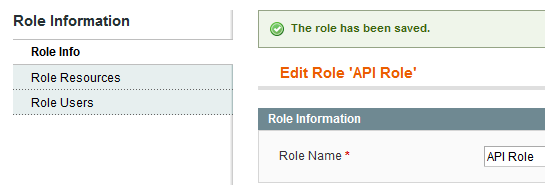
    4) Create new Role

    createRoles


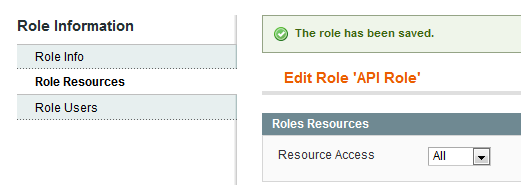
    5) Select “All” from Role Resources

    assign_resources


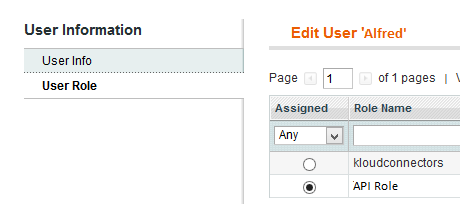
    6) Now Go to System > Webservices > Users > Select the role which has Resource Access “All”
     

    assign_role


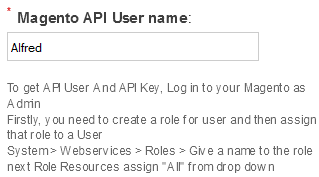
    7) Now Enter your Magento User Name

    magento-4


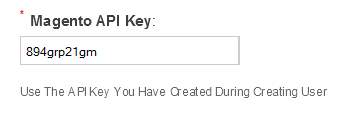
    8) Enter the Magento API Key

    magento-2


    3.Do I need to do any settings in  in KloudConnectors to enable this feature ?

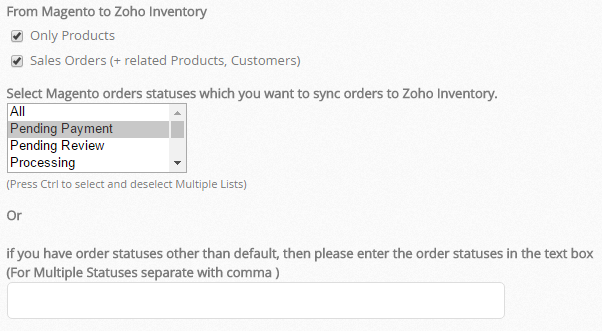
    Answer : You just need to go in your KloudConnectors account and change the setting as per your requirement for example if you want to sync only your Magento products in your Zoho Inventory choose “only products” option and if you want to sync both sales orders and product choose both the options.
     Magento products in your Zoho Inventory


    4.How does this feature work ?

    Answer :Our Magento to zoho inventory connector can create product and Sales orders and corresponding Contacts and Products in Zoho Inventory.

    Few things you need to take care of :

    – Sku is mandatory and uniqe for every product so make sure that all your Magento Products have SKU.
    – If you have product in both the system please make sure that product name and sku should be same.
    – If you use taxes in your order check in your zoho inventory account toenable your tax setting.

    This connector is available for 15 days free trial.

    Try NowBuy Now


    If you have any questions, please write to support@kloudconnectors.com.

  • Kashoo users : MailChimp add-on is here!!!


    Kloud Connectors is happy to announce the addition of one more Connector to our family, KTM (Kashoo To MailChimp ) Connector. Now, even Accounting guys can easily send beautiful emails to their customers using MailChimp!

    Kashoo to Mailchimp Connector

    This one way connector is designed to follow the business process within companies. It gives you option to choose whether you would like to sync customers or vendors or both to MailChimp. It also gives you flexibility of choosing which MailChimp lists each should go. Using custom fields mapping, you can also ensure that any changes in names, phone numbers, address is correctly reflected in both your Clouds, Accounting cloud as well as Email cloud.


    This integration between Kashoo and MailChimp by Kloud Connectors gives you a facility to schedule the syncs. This way, you don’t have to remember to sync them, the changes will get synced automatically everyday at a time of your choice. The dashboard of your Kloud Connectors account will show you Sync Details as well as Sync Errors if any, so that you can take corrective actions right there. Giving Such transparency in syncs, such control over data to all the users is a hallmark of Kloud Connectors. And for this connector as well, we have provided all these facilities to give a consistent experience to all our users.


    15 days Free Trial is available for KTM


    Connector so that you can see it in action before clicking the buy button. The price of monthly subscription, where there is no limit on number of records imposed by us, starts from US$ 5. For such a small amount, what you get is a hassle free working with both the Clouds that you love, Kashoo and MailChimp.


    If you are a Kashoo User and MailChimp fan, why don’t you give it a try ? Trial is Free.
    And it works with all the editions, including the free ones!